What Is wiCode and How Does It Work in South Africa? (2026)
A wiCode is not an app or a voucher someone sends you — it's a one-time code you generate yourself to put cash in or take cash out at a supermarket till. How it works, where it works, what it costs, and how it differs from an eWallet.

Quick answer: wiCode is a till-point payment technology used across South African retail. In a wallet app like SOLmate it does one job supremely well: it turns the supermarket till into your cash point. You generate a one-time code in the app, show it at the till at Shoprite, Checkers, Usave or Pick n Pay, and either hand over cash to load your account or take cash out of it. The code lives for one hour, works once, and you can hold one active code at a time. No card, no ATM, no bank branch. Here's the full picture — including the difference between a wiCode and an eWallet, which trips a lot of people up.
What wiCode Actually Is (and Isn't)
Three things clear most of the confusion:
- It's not an app. There is no wiCode app to download and no wiCode account to open. wiCode is the technology behind the scenes that lets a shop till talk to your wallet app. You use it from inside an app you already have — the same pattern as PayShap living inside banking apps.
- It's not money someone sent you. A wiCode moves your own balance between your account and cash in your hand. If someone sent money to your cellphone number and you got an SMS, that's an eWallet voucher — a different mechanism with different rules, covered below.
- It is a one-time key. Each code is generated fresh for one specific transaction and amount, works once, and expires after an hour. That short life is a security feature, not an inconvenience.
Taking Cash Out With a wiCode
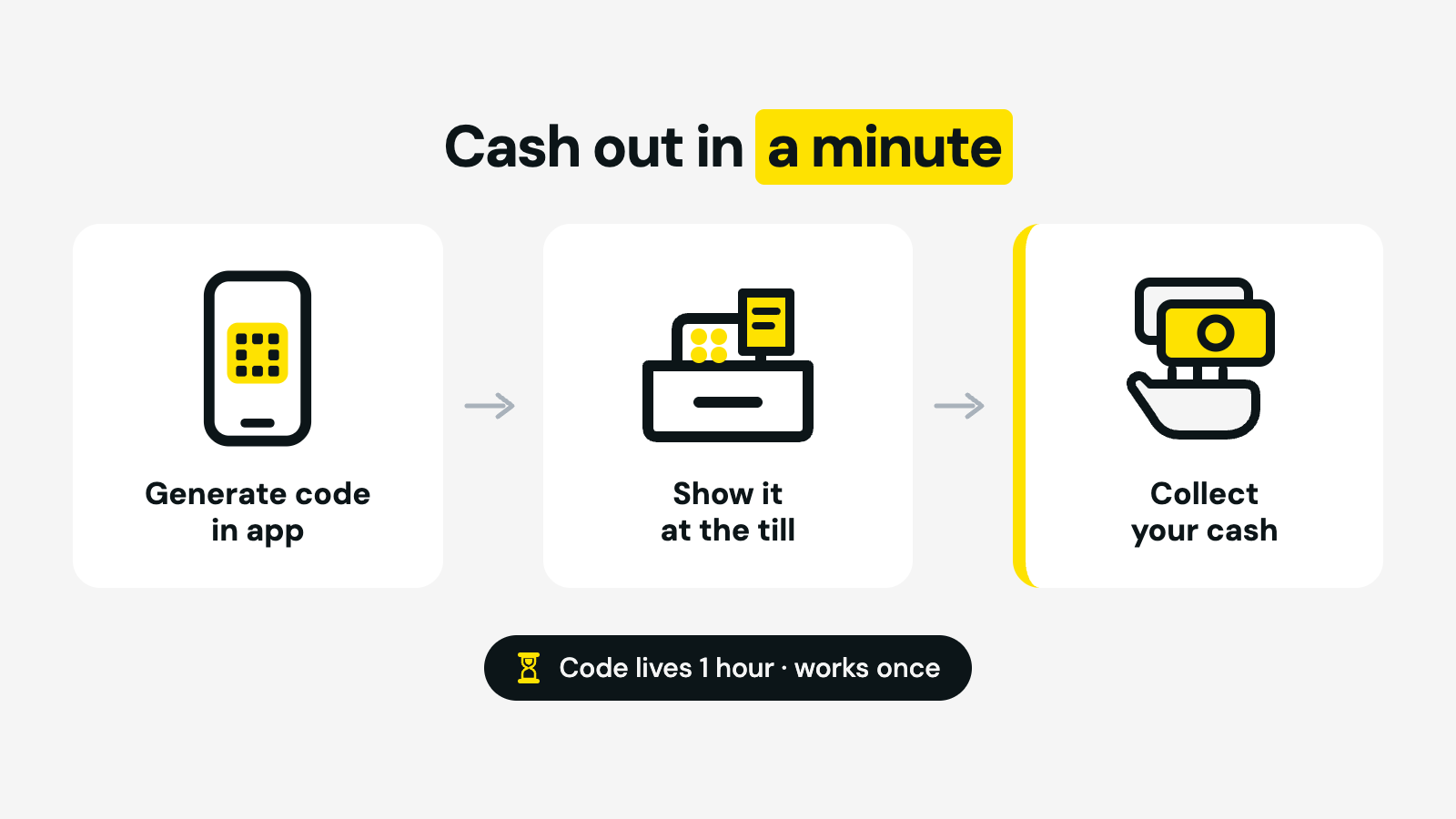
The everyday use. In the SOLmate app the whole thing takes under a minute:
- Open the app and tap Send Money → select wiCode Withdrawal.
- Enter the amount and generate your unique code.
- Go to the till at Shoprite, Checkers, Usave or Pick n Pay and show the code.
- Collect your cash.
The fee from a SOLmate wallet is a flat R10 per withdrawal — the same whether you take out R200 or R2,000, which is exactly why the till beats the ATM on bigger amounts (ATMs charge per hundred rand). The full comparison of card-free routes — tills, cardless ATMs and vouchers — is in our guide to withdrawing money without a card.
Putting Cash In With a wiCode
The same tills work in reverse — the supermarket replaces the bank branch for deposits too:
- Open the app and tap Receive Money → select wiCode Deposit.
- Enter the amount and generate your code.
- Present the code at the till at Shoprite, Checkers or Usave and hand over the cash.
Deposits reflect instantly. The fee is 1.75% of the amount, with a minimum of R14 — so small top-ups carry proportionally the heaviest charge, and it's worth depositing in fewer, larger amounts rather than many small ones. If you're paid in cash, one weekly deposit beats four daily ones.
Where wiCode Works
For SOLmate users the participating retailers are Shoprite, Checkers and Usave for deposits, plus Pick n Pay for withdrawals. That's thousands of till points across the country — including places where the nearest bank branch or working ATM is a taxi ride away, which is precisely the point. If you've seen "wiCode" on a till slip or a voucher screen at one of these shops, it's the same network doing the same job for various apps and services; what your code can do is always defined by the app that generated it.
wiCode vs eWallet: Not the Same Thing
This is the confusion that costs people time at the till, so here it is plainly:
- A wiCode you generate yourself, in your own app, to move your own balance — in or out. Nothing arrives by SMS; there is nothing to claim.
- An eWallet is money sent to a cellphone number — usually yours, by someone else. It arrives with an SMS, is claimed with a one-time PIN, and unclaimed vouchers eventually return to the sender. The full mechanics are in our guides on how eWallets work and how to withdraw eWallet money.
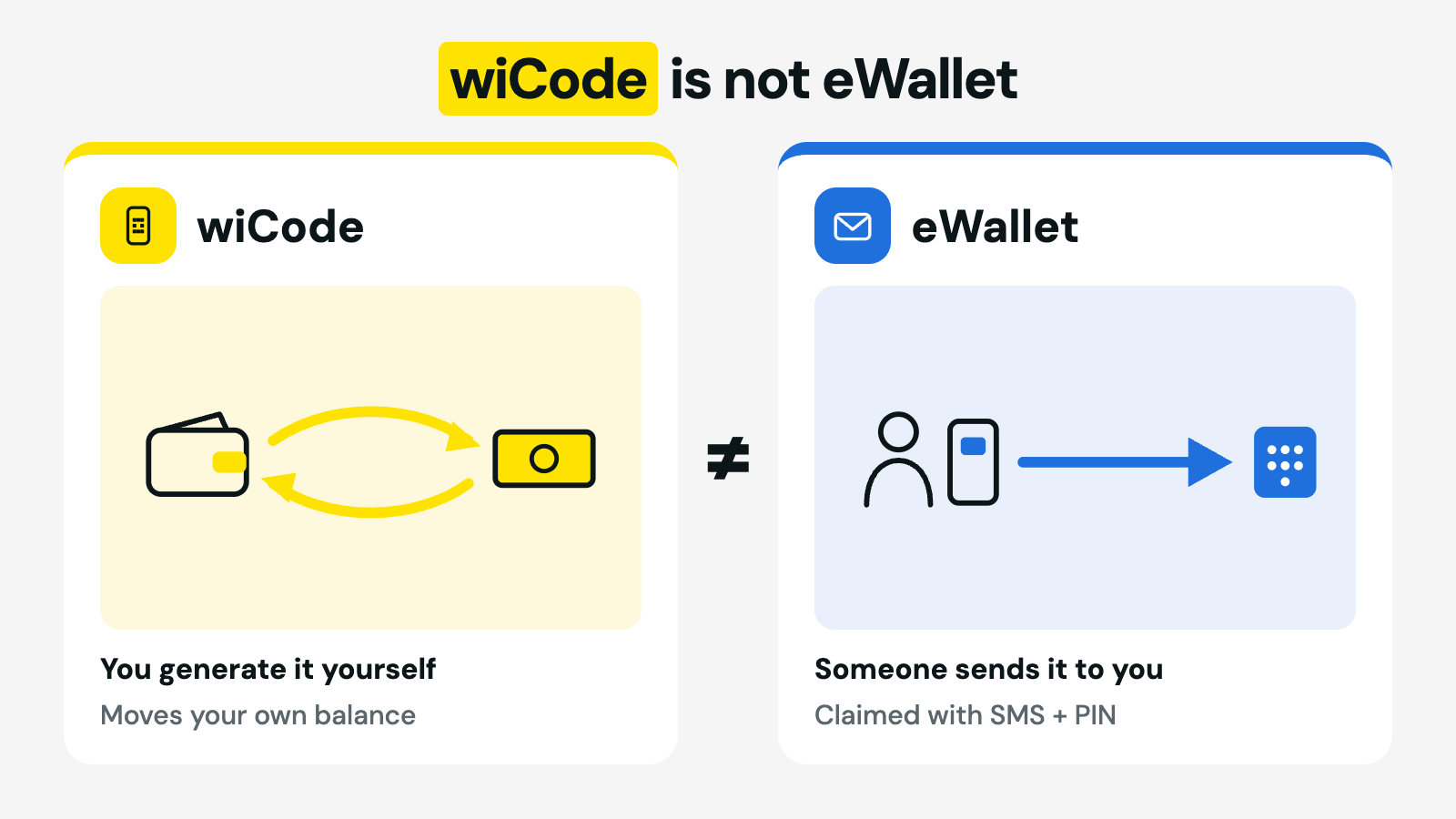
Practical consequence: if money was sent to you, don't look for a wiCode option — follow the SMS instructions for the voucher. If you're cashing out your own balance, wiCode is your route.
What It Costs (SOLmate's Published Fees)
| wiCode operation | Fee | Notes |
|---|---|---|
| Withdrawal at the till | R10 flat | Any amount within your limits |
| Deposit at the till | 1.75% (min R14) | Reflects instantly |
Both operations count toward SOLmate's combined transaction limits of R10,000 a day and R25,000 a month — the detail is on the limits help page, and all fees are from the public fee table. How till-point pricing compares with ATMs, cashback and vouchers rand-for-rand is worked through in the card-free withdrawals guide.
Safety and Troubleshooting
- The one-hour expiry protects you. If your code lapses, nothing happened — the money never left your account. Generate a fresh one when you're actually at the shop, not before you leave home.
- One active code at a time. You can't hold several codes at once; a new one becomes available after the current code is used or expires. This stops anyone quietly generating codes off your account.
- Never share a code. A live wiCode is cash for whoever presents it. No support agent, employer or "helper" has a legitimate reason to ask for it — and an expired code is a non-event, so ignore anyone creating panic about one.
- Code won't generate? Wait a few minutes and try again; if it keeps failing, contact support through the in-app chat. The step-by-step product answers live on the wiCode help page.
The Bottom Line
wiCode quietly solves the problem that keeps many South Africans tied to cash logistics: getting money between an account and your pocket without a card, a branch or a working ATM. A code in your app, a till you already walk past, under a minute at the counter. If you don't yet have an account that can do this, opening a SOLmate account takes about 3 minutes with a passport, SA ID or asylum permit — and the till downstairs becomes your bank counter.
Frequently Asked Questions
What is wiCode?
wiCode is a till-point payment technology used in South African retail. In a wallet app like SOLmate, it lets you deposit or withdraw cash at participating supermarket tills using a one-time code you generate in the app — no card or ATM needed.
Is there a wiCode app?
No. There's no wiCode app to download and no wiCode account to open — it works from inside your wallet app. In SOLmate, wiCode options are under Send Money (withdrawal) and Receive Money (deposit).
Where can I use a wiCode?
With SOLmate: deposits at Shoprite, Checkers and Usave; withdrawals at Shoprite, Checkers, Usave and Pick n Pay — at the till, not a separate money desk.
Does a wiCode expire?
Yes — after one hour, for both deposits and withdrawals. If it expires, your money stays in your account and you simply generate a new code. You can hold one active code at a time.
How much does a wiCode cost?
From a SOLmate wallet: withdrawals cost a flat R10; deposits cost 1.75% of the amount with a minimum of R14. Both count toward the R10,000 daily and R25,000 monthly limits.
What's the difference between a wiCode and an eWallet?
A wiCode is a code you generate yourself to move your own balance in or out as cash. An eWallet is money someone sends to a cellphone number, claimed via SMS and a one-time PIN. If money was sent to you, follow the voucher SMS — don't look for a wiCode.
What if my wiCode doesn't generate?
Wait a few minutes and try again. If it keeps failing, contact support via the in-app chat — and remember a failed or expired code never takes money from your account.
Sources: SOLmate wiCode help page, SOLmate fees, limits help page. Fees and retailer lists correct as of September 2026 — always check live fees in the app. This is general information. SOLmate is not a bank. SOLmate (SOL Ecosystem (Pty) Ltd) is an authorised financial services provider (FSP No. 52248) and registered credit provider (NCRCP16037).